


Daylight Illuminance (DI)
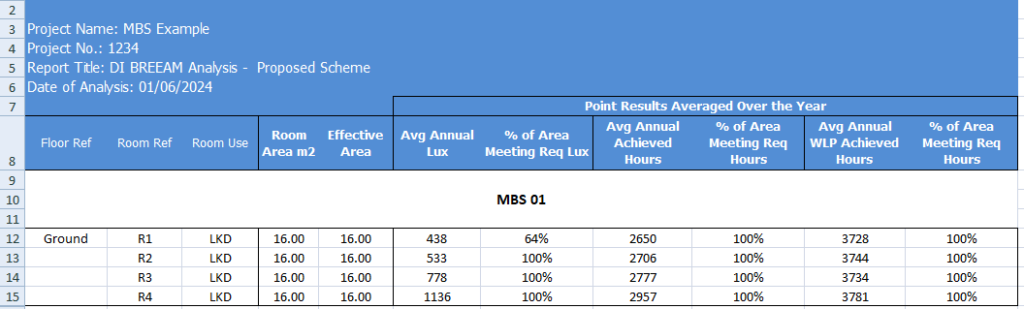
BREEAM Illuminance (DI) Criteria
Terms and Definitions
Average daylight Illuminance
Daylight illuminance for all points in the space for a specific hour (e.g. 1st Jan 8 AM) is averaged. If this average is over the target lux (e.g. 300 lux) value, the hour will count towards the achieved hour for the target lux.
Minimum Daylight Illuminance
The lowest point daylight illuminance in the space at a specific hour e.g. 1st Jan 8 AM) on the working plane within a room. The minimum point daylight factor is the lowest value of the daylight factor on the working plane at a point that is not within 0.5m of a wall. If this lowest lux value is over the target lux min value (e.g. 90 lux), the hour will count towards the achieved hour for the target lux min.
BREEAM DI Results
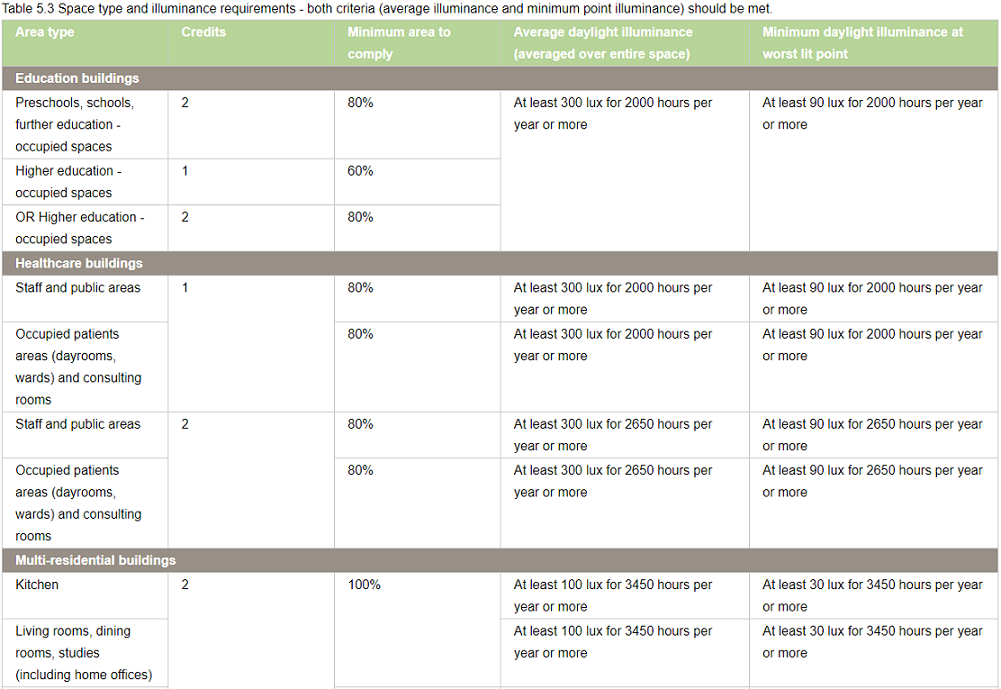
The DI results can be presented visually in 4 different ways.
- As shown in the image, the Meets criteria option will show a single colour image for the room based on whether Achieved hour > Target Lux and/or Worst lit point achieved hour > Target Lux Min are met or not.
- Please note that the rest of the three options are alternative presentation of the result and do not show the achieved hour for target lux and target lux min as averaged over the space
- The Lux (Avg Over Year) option can be used to show the average lux achieved by each point in the room over the year.
- Hours (Over Year > Req Lux) option can be used to show the number of hours when each point in the room achieve the req lux.
- Hours (Over Year > Req Lux Min) option can be used to show the number of hours when each point in the room achieve the req lux min.
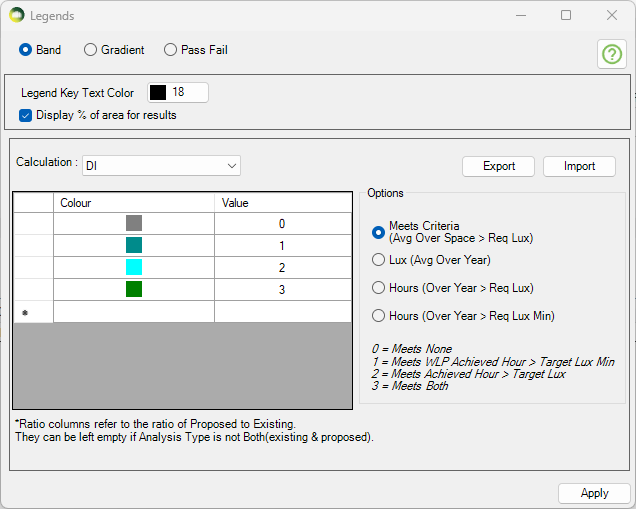
The DI Excel result contains the results for the main criteria as well as some alternative results.
As shown in the DI criteria results image,
- The Req Lux Achieved Hours column shows the total number of hours when lux value averaged over the space is at least 300 Lux.
- The WLP Achieved Hours column shows the total number of hours when the worst lit point lux value (except foe the points within 0.5m of the wall) is at least 90 Lux.
- The Meets Criteria column shows Yes, If both Req Lux Achieved Hours and WLP Achieved Hours are more than the 2000 hours (Req hour per year).
The Alternative result columns are to the right of the Meets criteria column and are added to give alternative results for each points over the year.
- The Avg Annual Lux column shows the average lux value based on the average lux achieved by all the points in the room. Each points average lux value can be shown by using the Lux (Over the year) option in Legend settings.
- The % of Area Meeting Req Lux column shows the percent of the points which have an average of at least 300 Lux.
- The Avg Annual Achieved Hours column shows the average achieved hours value based on the achieved hours with at least 300 lux achieved by all the points in the room. Each points achieved hours with at least 300 lux can be shown by using the Hours (Over Year > Req Lux) option in Legend settings.
- The % of Area Meeting Req Hours column shows the percent of the points which achieve 2000 hours with at least 300 Lux.
- The Avg Annual WLP Achieved Hours column shows the average achieved hours value based on the achieved hours with at least 90 lux achieved by all points in the room. Each points achieved hours with at least 90 lux can be shown by using the Hours (Over Year > Req Lux Min) option in Legend settings.
- The % of Area Meeting Req Hours (WLP) column shows the percent of the points which achieve 2000 hours with at least 90 Lux.

Spatial Daylight Autonomy (SDA)
The Spatial Daylight Autonomy (sDA) calculation is based on the EN 17037 methodology for daylight assessment, in accordance with BREEAM guidance. For further details, please refer to GUIDANCE NOTE 50, Section 1.3.
BREEAM Recommendation
The EN 17037 gives three levels of recommendation for daylight provision in interior spaces: minimum, medium and high.
- To meet the standard credits, a space only need to reach the minimum level.
- To qualify for the Exemplary credits, the space must reach the high level.
In both cases, the required minimum area that meets daylight levels depends on the building type and must meet in accordance with the standard and exemplary level credits.
For rooms that receive daylight from windows or sloping openings, enough light should reach the working area (the reference plane) for at least half of the year’s daylight hours. Specifically:
- A main brightness target (ET) should be met in at least half of the space.
- A lower minimum brightness level (ETM) should be met almost everywhere — at least 95% of the space.
Following table shows the exact light levels for window-lit rooms. A space is considered well-lit if it meets both the main brightness target (ET) and the minimum brightness target (ETM).
| Level of recommendation | Target illuminance ET (lx) for half of reference plane | Minimum target illuminance ETM (lx) for 95% of reference plane |
| Minimum | 300 | 100 |
| Medium | 500 | 300 |
| High | 750 | 500 |
For rooms lit from above (such as skylights or roof openings), the main brightness target (ET) should be met in almost the entire working area — at least 95% of the space — for at least half of the year’s daylight hours. Following table shows the required light levels for these top-lit spaces. Unlike window-lit rooms, there is no additional minimum brightness requirement (ETM).
| Level of recommendation | Target illuminance ET (lx) for 95% of reference plane |
| Minimum | 300 |
| Medium | 500 |
| High | 750 |
Setting up Assessment Criteria
- Open the Settings dialog.
- Select the Climate Daylight tab.
- In the Climate-Based Calculation section, set the regulation to EN 17037.
- Click on … (options) and choose SDA Calculation.
- Select the Targets values as needed:
- For standard credit select the row with 300 lux.
- For exemplary credit select the row with 750 lux.
- If needed, update the target values and other criteria to match your project requirements.
Sunlight Exposure (SE)
BREEAM Recommendation
Each relevant units* must have at least one area that gets 3 or more hours of direct sunlight on equinox days (21 March or 21 September) under clear skies.
Reference Points for Calculation
- For windows – reference point must be the inside face, at the centre of the window width, and at least 1.2 m above the floor or 0.3 m above the sill (whichever is higher).
- For rooflights – reference point must be the geometrical centre of the opening on the inside face.
*A relevant unit would be a distinct building or space intended for single residential-like occupancy type. Where units are self-contained, such as a house or flat each self-contained unit must be considered separately. Where there are shared communal areas such as in a residential care home, then the whole care home can be considered one relevant unit. In a healthcare scenario, a healthcare ward that overnight patients have direct access to would be considered one unit.
Setting up Assessment Criteria
- Open the Settings dialog.
- Select the Climate Daylight tab.

Spatial Glare Autonomy (SGA)
SGA is an annual DGP calcualtion (Daylight Glare Probability).
BREEAM Recommendation
| Glare protection level | DGPe<5% | BREEAM exemplary glare performance |
| Minimum | 0.45 | No |
| Medium | 0.40 | Yes |
| High | 0.35 | Yes |
Limitation of Software
The software runs the SGA calculation for the entire room. To determine whether individual workstations meet the exemplary level criteria, the user must either perform a manual calculation using the grid point results or register each workstation as a separate room.
Setting up Assessment Criteria
- Open the Settings dialog.
- Select the Climate Daylight tab.
- In the Climate-Based Calculation section, set the regulation to EN 17037.
- Click on … (options) and choose SGA Calculation.
- Select the Targets values as needed:
- For example select Target DGP 0.4 to meet BREEAM medium Glare protection level.
- If needed, update the target values and other criteria to match your project requirements.
Annual Sunlight Exposure (ASE)
BREEAM Recommendation
Annual Sunlight Exposure (ASE₁₀₀₀,₂₅₀ ≤ 10%)
No more than 10% of the occupied floor area in relevant building spaces may receive a daylight illuminance of ≥ 1000 lux for ≥ 250 hours per year.
Setting up Assessment Criteria
- Open the Settings dialog.
- Select the Climate Daylight tab.
- In the Climate-Based Calculation section, set the regulation to LEED.
- Click on … (options) and choose ASE Calculation.
- If needed, update the Target Lux, Target Hours and Area to Comply to match your project requirements.
Default annual occupancy hours can be taken to be 8am to 6pm local clock time on Monday to Friday. This parameter can be modified by unticking the Sunrise to Sunset Option in Climate based calculation section.
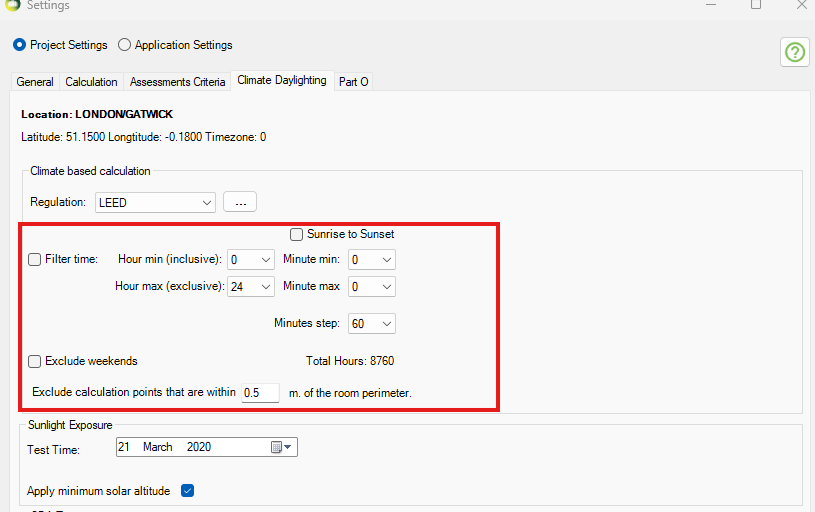
ASE occupancy hours
View out
BREEAM Recommendation
At least 75% of the floor area in 95% of relevant spaces must meet both of the following criteria:
- A horizontal sight angle of 28° or greater.
- A view that includes the landscape layer and at least one other layer (sky or ground) through a permanent opening.
Setting up Assessment Criteria
- Open the Settings dialog.
- Select the Assessment Criteria tab.
- In the View section.
- If needed, update the target values and other criteria to match your project requirements.
- The target % of area required to meet criteria is taken from % of Utilized Area. This value must be 75% to meet BREEAM recommendation.
- Target % of relevant space required to meet is taken from Target % of Spaces In a Building section. This value must be 95% to meet BREEAM recommendation.
- A horizontal sight angle value is taken from Medium field of Horizontal Sight Angle section.
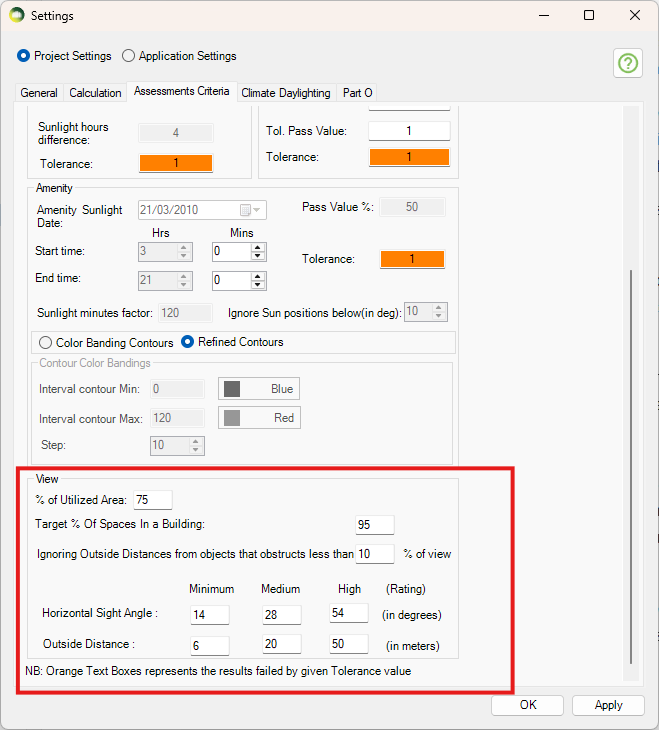
View Out Assessment Criteria
