


- Open cutback dialog by entering MBSCutback command or By pressing the Cutback icon on the mbs tool bar.
- Select group
- Select Sky type. For ROL cutback Sky should be set to Uniform.
- Orientation is the surface orientation where the calculation point lies on.
Set the Orientation to Vertical for Windows, and Horizontal for ROL
Although ROL calculation is for a point on a horizontal surface(working plane), the rendered image for points deep in the room might come in low resolution.
You may pick Vertical orientation in this case for ROL to get a higher resolution Waldram image. - Select Room or Window from the box and press Select.
If Room option is selected, a point within the room needs to be selected too. - Press “Create Diagram” to render Waldram image.
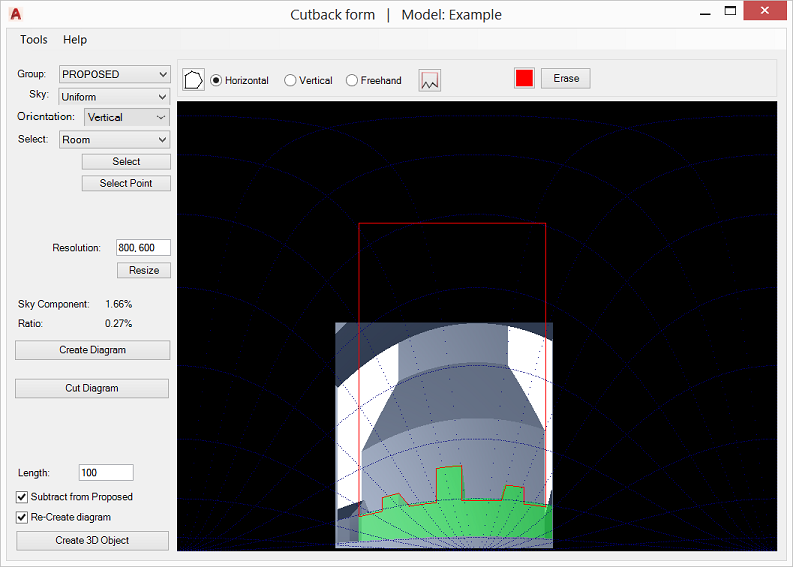
To start drawing shape press button. There are three tools available to draw shape:
- Horizontal mode: draws droop line on the diagram. The result is straight horizontal line in 3d.
- Vertical mode: draws vertical line.
- Freehand mode: draws polyline on the diagram with any number of segments.
To close the shape at specified high, press and pick a point on the image. The shape will be closed by adding three perpendicular segments as in the image below.
You may press “Cut diagram” button to cut the drawn shape on the image and update Sky Component value. This does not create/cut the 3d model. Instead it can be used to check whether the resulting Sky Component is close to the desired value.
To draw new shape it is suffice to press Erase button. - Pressing “Create 3D Object” will create the 3d object(s) in the model from the shapes on the diagram (The user can later subtract the created object from proposed objects). Tick “Subtract from Proposed” to automatically subtract the shape on the diagram from the 3d proposed objects. The subtracted object is put into “CutbackInterference” layer in red colour.
Tick “Re-Create diagram” to automaticaly reconvert and create the new diagram. In case of room new contours are calculated.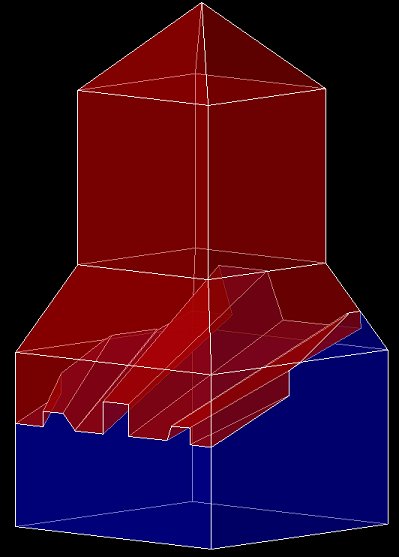

Privacy Overview
This website uses cookies so that we can provide you with the best user experience possible. Cookie information is stored in your browser and performs functions such as recognising you when you return to our website and helping our team to understand which sections of the website you find most interesting and useful.