Renumbering can be useful if windows and rooms are added or removed from the model after the initial registration. It can also be useful if the numbering of the windows needs to start from a different position. Renumbering can be done for All Floors, Single Floor or Partial Floor in a building. Single and All Floor renumbering options need the building polyline and building name block (Both of them must be on the building_polylines layer).
Renumber Options are in the Modify Dialog Room tab.
All Floors
Once Re-Number All floors option is selected, a prompt is given to select the building polyline. Then the rooms and windows in all floors above the starting floor (as specified in building detail block) will be renumbered based on the selected building polyline. This doesn’t alter the floor references of rooms and windows.
Please note that if there are any window/room within the building polyline but have a different building address to the one in building detail block, they will not be included in the renumbering process.
Single Floor
Once Re-Number Single floor option is selected, a prompt is given to select the building polyline. Then, another prompt is given to Select one registered window in the floor where the renumber is to be done. Then the rooms and windows in the floor of the selected window will be renumbered based on the selected building polyline. This process considers windows/rooms which are already registered in the floor and building address only.
Please note that if there are windows within the building polyline and in the same height as other windows in the selected floor but are registered with different floor or building name, then they will not be part of the renumbering process.
Partial Floor
Once Re-Number Partial floor option is selected, a prompt is given to select a reference polyline (this can be an open polyline different from the building polyline). Then, another prompt is given to Select the windows to be renumbered. Then, Starting window number can be entered without the prefix e.g. 10 for W10. Once window renumbering is complete, prompt is given to confirm if the rooms should be renumbered too and starting room number can be entered if affirmed.
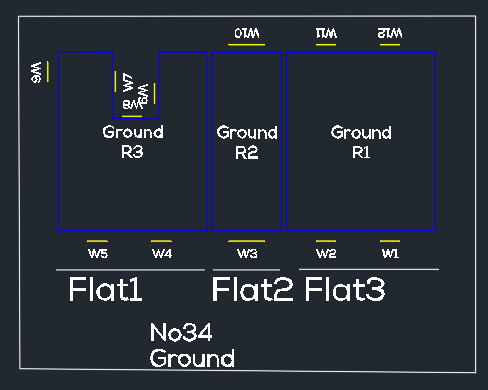
This option is useful if the windows need to be renumbered in noncontinuous manner for flats within the same building as shown in image.
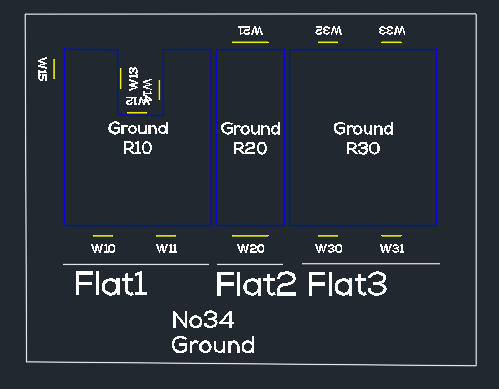
Please note that the partial renumbering cannot automatically handle duplicates if existing window which is not being renumbered uses the same number. In order to avoid duplicate issue, partial renumbering should be done for higher window numbers. For example, Let’s say Flat 1 window need to start from 10, Flat 2 windows from 20 and Flat 3 windows from 30. If Flat 1 is to be renumbered first and window numbers will conflict with W10 on Flat 2 and W11,W12 on flat 3. However, if Flat 3 is renumbered first, followed by Flat 2 and then Flat 1 the conflict can be completely avoided as shown on the image below.