


Download and Install Radiance from this link:
Radiance Version 5.2 Installer
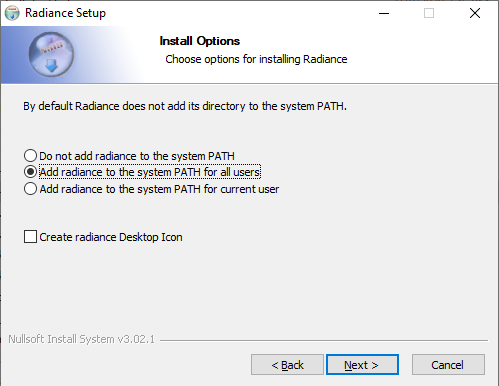
Please Make sure to select “Add Radiance to the system PATH for All Users” option during installation, as in the image.
Keep the default destination folder “C:\Program Files\Radiance”
After the installation, download and copy extra radiance executables
wxfalsecolor.exe (Needed for viewing Radiance HDR images)
falsecolor2.exe (Needed for Irradiance Colour Renders)
dcglare.exe (Needed for Spatial Glare Autonomy)
to Radiance installation bin folder: “C:\Program Files\Radiance\bin”
Fix for PATH TOO LONG… Warning during installation Or Radiance not installed error during conversion
- The warning is caused due to the Path System variable being too long.
- The installation is successful but the path needs a manual fix.
- The fix is to manually add the radiance install folder to the environment variables
- Search for Edit the System Environment Variables on Windows Search bar
- Press Environment Variables button
- Find the Path entry on the System variables list
- Edit and add C:\Program Files\Radiance\bin to the end of the list if it doesn’t exist already
- Add a new entry for RAYPATH with C:\Program Files\Radiance\lib;.
- Press Ok. Ok
- Open command prompt and type oconv
(Should get the below message if the path is set correctly)
#?RADIANCE oconv FORMAT=Radiance_octree
